
There are a few concepts we would like to introduce you to to make Mago as clear as possible. These are terms that we've used over and over again, so becoming familiar with these will make you familiar with the entire application as a whole.
One such aspect is our use of menus. In addition to the primary navigation menu that we have on the left of the screen, in various parts of the application you will see menus indicated by three dots. Anytime you see a "..." menu, we call that an action menu. Clicking on that menu brings up a list of actions that you can take on that particular record, regardless of what record you're looking at. The actions available to you are contextually based, so the options will vary based on the type of record you're looking at.
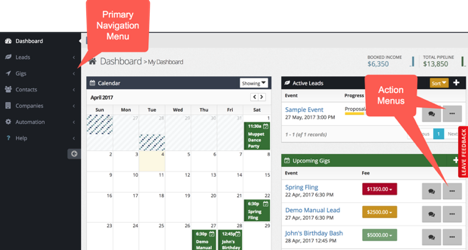
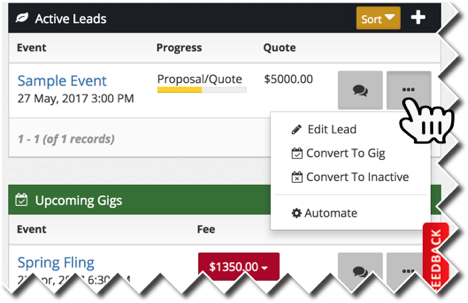
In this case on the dashboard, the options are to edit the lead, to convert the lead into a gig (it's been booked), to convert a lead to inactive (it's not going to be booked), or to run some kind of automation sequence.
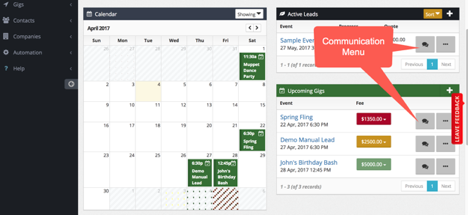
Right next to our action menu, we have a communication menu. These dialog speech balloons indicate actions that relate specifically to communication. In this example of a lead, it's possible to compose an email, schedule or log a phone call, or run an automation sequence. Automation in Mago can span a wide range of activities. Not just sending emails, but a number of other internal things can be automated, so it is offered as an option in both the action and communication menus.
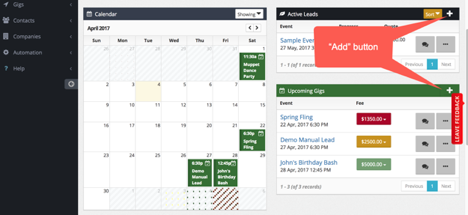
Another important tool is the "add" button. Wherever you see a plus sign, you can add to that particular record. Clicking the plus under the contacts allows me to create a contact. If I click the plus next to the company, it allows me to create a company, or if I click a plus by the lead source, it allows me to create a lead source.
That's a quick run-down of some of the core concepts and basic terminology you will need to be familiar with in order to get the most out Mago.